
Placing an order
Choose your items, check your delivery details and place the order.
Choose your items
- Find items by scrolling, by selecting a category (Vacutainer tubes, needles and holders, sample bags, containers, gynae and cytology, swabs), or by typing in the search box. You can search by name or by product code, for example
TUB-01. - Use + and −, or type a number, to set how many you need. Check the pack size under each item: some come in packs (e.g. "Pack of 100"), others singly.
- Select an item's picture to see a larger photo of it.
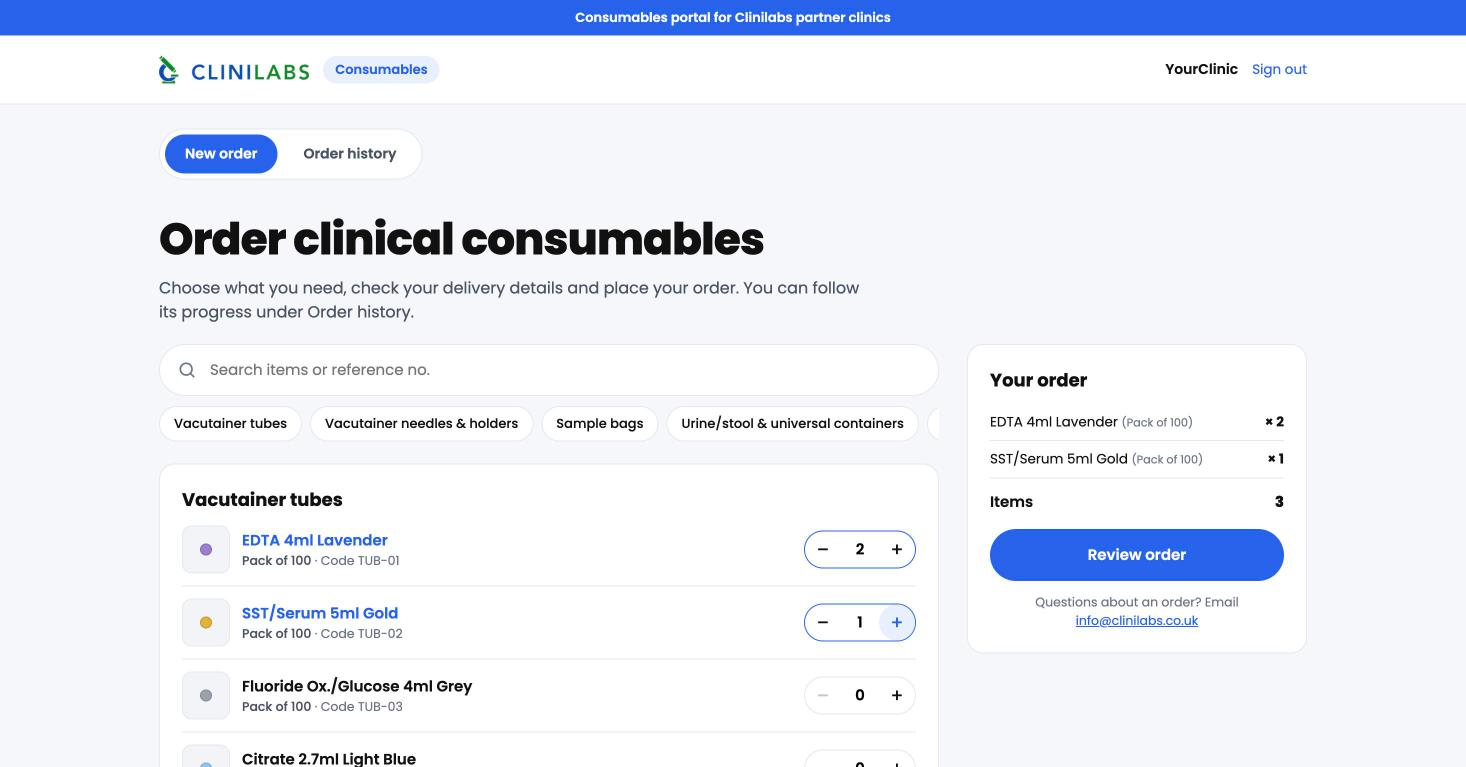
The search box and categories stay at the top of the screen as you scroll, and your order summary stays on the right (at the bottom on a phone).
Something not on the list?
Use Anything else? at the bottom of the page to request other items. We'll be in touch about those separately.
Check out
- Select Review order.
- Check the items and your delivery details: contact name, phone, email and delivery address. They're filled in from your last order, so you only need to change them if something's different.
- Add any notes for us, for example a delivery instruction.
- Select Place order.
You'll see your order reference (it starts CL-) and you can follow its progress under Order history. See Tracking your order.
Delivery depends on stock, and usually takes 2 to 7 working days. Some items can take longer. You'll see updates under Order history as items are dispatched.